Ray1man's IPAD World

Day to day - Memos, Vents and other interesting items. IPAD apps and accessories from around the web..


Friday, January 23, 2015

Sun

635575180897947252-Screen-Shot-2015-01-22-at-9.14.02-AM

Sent from my iPad
Posted by Rayman at 5:32 AM No comments:
Email ThisBlogThis!Share to XShare to FacebookShare to Pinterest

Tuesday, April 15, 2014

Super cool. Smart bean

The Bluetooth Fairy

You've gone through dozens of subpar pairs of headphones over the years. After a lot of trial and error, you've settled on The Perfect Pair of headphones for what you need, and you even got a backup pair in case they stop making them, because you don't want all that work to be for naught.

However, technology constantly marches on, and one direction it's marching not all headphone manufacturers foresaw: wireless. So while your latest purchases are all Bluetooth-compatible, your favorite headphones aren't. The Smartbean can fix that. Plug the headphones' 3.5 standard audio jack into this little device, and it'll play receiver for you. Go long! Well, not longer than 30 ft., but it'll deliver your music wirelessly to your headphones pretty much anywhere within a room so you're no longer tied down.

Product Specifications

  • Wireless receiver makes your favorite headphones Bluetooth-compatible
  • Use the integrated microphone and audio controls to adjust volume, pause, and skip tracks
  • Switch seamlessly between audio and phone functions
  • It's intended for headphones, but we couldn't think of a good reason you couldn't use it with speaker
  • Wireless Range: 30 ft.
  • Batteries: Rechargeable (provides ~ 6 hours talk time)
  • Charging Time: ~ 2.5 hours (DC 5V)
  • Dimensions: 1 3/4" x 1 1/4" x 1/3" thick
  • Weight: Less than an ounce
  • Includes Bluetooth receiver, micro-USB charging cable, and manual
Get it at thinkgeek.com 


Posted by Rayman at 8:30 PM No comments:
Email ThisBlogThis!Share to XShare to FacebookShare to Pinterest

Tuesday, February 04, 2014

Article: 40 Quirky Charging Devices - From Repurposed Tank Chargers to Gas Mask Smartphone Chargers

40 Quirky Charging Device

40 Quirky Charging Devices - From Repurposed Tank Chargers to Gas Mask Smartphone 


Sent from my iPad
Posted by Rayman at 6:05 AM No comments:
Email ThisBlogThis!Share to XShare to FacebookShare to Pinterest

Tuesday, March 19, 2013

McDonald's hamburger recipes

Need some Micky d's. make your own

McDonald's hamburger recipes
EPICCONSTRUCTIONS.COM
http://pulse.me/s/jFVuf/


Best Regards
Ray
Posted by Rayman at 9:01 PM 12 comments:
Email ThisBlogThis!Share to XShare to FacebookShare to Pinterest

Thursday, March 14, 2013

The SAFE wallet – iPhone case and wallet all in one!


The SAFE wallet – iPhone case and wallet all in one!
THE GADGETEER | MARCH 14, 2013
http://pulse.me/s/jvUxg


Several times I have watched my husband pull a few cards or dollar bills from his wallet just before going out and leave the ... Read more

--
Sent via Pulse/


Best Regards
Ray
Posted by Rayman at 7:34 PM 2 comments:
Email ThisBlogThis!Share to XShare to FacebookShare to Pinterest

Tuesday, January 15, 2013

Shots


Best Regards
Ray
Posted by Rayman at 7:24 PM No comments:
Email ThisBlogThis!Share to XShare to FacebookShare to Pinterest

Sunday, December 09, 2012

Best overall tablet: iPad Mini

Best overall tablet: iPad Mini

iPad mini 1

When it came to deciding on the best tablet of the year, the choice was simple. I love the iPad Mini. It's everything that the large iPad isn't: light, convenient, and preciously tiny. It packs in the power of the iPad 2 in the weight of your average paperback book, and it still manages to be the cheapest iPad offering yet at $329 (compared to the big iPad's standard $499 price).

Sure, it doesn't have a sharp Retina Display, and its hardware is admittedly dated, but it's one of those devices that you need to touch and feel to truly appreciate. Once you use the iPad Mini for a day, it's almost impossible to go back to anything bigger.

The Android-powered Nexus 7 is a much better deal for $199 (more on that below), as is Amazon's 7-inch Kindle Fire. But both of those tablets lack the iPad Mini's superior assortment of apps. Apple clearly isn't trying to compete with other smaller tablets when it comes to price.

If your budget's tight, it may be tough to justify the iPad Mini compared to its pint-sized competitors. But if you don't mind spending a bit more, the iPad Mini will undoubtedly be your best tablet choice (until the iPad Mini 2 comes out).


Read more at http://venturebeat.com/2012/12/09/tablet-gift-guide-ipad-mini/#27FZVBuukHtJFoDY.99 

Sent from my iPad
Posted by Rayman at 10:09 AM 1 comment:
Email ThisBlogThis!Share to XShare to FacebookShare to Pinterest

Saturday, December 08, 2012


Google Now coming to Chrome browser


Google Now is fast becoming one of Android's defining features. But, if some recent additions to Chromium are anything to go by, the nifty little life-predictor could well be finding its way to Chrome browsers, too. An entry in the Chromium project code site titled "Show Google Now notifications in Chrome" along with some code revisions for "Creating a skeleton for Google Now for Chrome implementation" hints that the idea is, at least, at some level of development. This of course means that the service would leap out of its current mobile OS restraints, and become available to a much wider audience -- at least those using some portion of the Google ecosystem -- and not just its Android platform. The code was spotted by an eagle-eyed François Beaufort, who points out the reference to it working with Chrome's desktop notifications. While we wait for more official word, we guess a card to notify us of when this might be coming would be too much to ask?

Article by James Trew  |  December 8, 2012


Posted by Rayman at 3:38 PM No comments:
Email ThisBlogThis!Share to XShare to FacebookShare to Pinterest

Thursday, March 29, 2012

Poddities – Hardware for your iPhone


Julie  |  March 28, 2012


Poddities are metal clips for your iPhone 4/4S that you can screw directly into the bottom of the phone. One clip offers an attachment point for hand straps, while the other one functions as a money clip. Both Poddities attach to the bottom of the iPhone by removing the existing screws on either side of the docking connector. A special screw driver is included with each clip and once installed, you can still plug in the charge/sync cable. Poddities can be purchased from Strapya World and are priced a $18.50 for the hand strap clip and $32.80 for the money clip.

Filed in categories: iPhone, iPad, iPod related, News

Tagged: iPhone

Poddities – Hardware for your iPhone originally appeared on The Gadgeteer on March 28, 2012 at 1:00 pm.


Best regards
Ray1man

Posted by Rayman at 9:01 PM No comments:
Email ThisBlogThis!Share to XShare to FacebookShare to Pinterest

Sunday, December 11, 2011

Joy Factory’s Klick Desk Stand for the iPad 2


Joy Factory's Klick Desk Stand for the iPad 2
COOLEST GADGETS | DECEMBER 8, 2011
http://pulse.me/s/3QCDN


It seems like any good mobile device always needs to have a stand, and Joy Factory's Klick Desk Stand is a good fit for ... Read more

--
Want to read news on the go? Get Pulse, an awesome news reader for iPad, iPhone and Android. Its Free!
/


Best regards
Ray1man

Posted by Rayman at 7:49 PM 5 comments:
Email ThisBlogThis!Share to XShare to FacebookShare to Pinterest

Saturday, November 05, 2011

Solar for the Masses


I was watching a solar field being built on 2 acres of prime farmland the other day as a thought occurred.
Why not, instead of putting this land to waste, Why not use the space that most of the power is consumed.
How about just lease the space on their customers roofs. I know me & many of my neighbors would be glad to offer up my roof for  leased space or discount utility rate fee.
So instead of the utility spending our  environment green energy fee's(that many are collecting) building a solar station that they can peddle to the power to elsewhere. Why not Spend the money to benefit the consumers directly at the point of use.

Posted by Rayman at 8:18 AM No comments:
Email ThisBlogThis!Share to XShare to FacebookShare to Pinterest

Friday, November 04, 2011

Nest – A Thermostat for the 21st Century

NOVEMBER 1, 2011 
BY JULIE @THE GADGETEER

Only in the last year did I finally replace my older than dirt mercury switch type thermostat with a programmable model. Although I've enjoyed the convenience of having the heat automatically come on in the morning before I wake up and then not come on while no one is home during the day, changing the program times is a big pain in the you-know-what. Doing so consists of pressing and holding a button till the info on the tiny LCD blinks. Then more button pressing is required to cycle through the days of the week, program times, etc. It takes a minute or two just to change the temp for a specific day and time. The Nest Thermostat looks like a much more elegant solution. It has a ring (sort of like an old style thermostat) that you rotate to adjust the temperature. After a few days of adjusting the temp, Nest learns to program itself to keep you at a comfortable temperature while also conserving electricity. At $249, the price is considerably more than other programmable thermostats, but if it works as well as it looks, I'd definitely like to give one a try in my house.


Posted by Rayman at 6:09 AM No comments:
Email ThisBlogThis!Share to XShare to FacebookShare to Pinterest

Monday, October 10, 2011

iFrogz Summit Case for iPad 2 Review


by JANET CLONINGER on OCTOBER 8, 2011 · 1 COMMENT

in IPHONE, IPAD, IPOD RELATED,REVIEWS

Ads by Google
invisibleSHIELD for iPad™
www.ZAGG.com/iPad
Order Protection for you iPad™ Military Grade & Lifetime Guarantee
Mino HD Camcorders
techexpert.com
Learn About Mino HD Camcorders Now. Let TechExpert Be Your Guide!
Financial Times On The Go
app.ft.com
Visit The FT Web App & Get Reliable News & Analysis.
hello

I've said it before, but I love cases, covers, and bags as much as I love gadgets.  I've been on an iPad 2 cover kick lately, and I have one more to tell you about.  iFrogz makes cases for a variety of Apple mobiledevices, headphones and audio gear, and cables.  They sent me an iPad 2 Summit Case to try out.

Most pictures in this review can be clicked for a larger view.

The Summit case weighs 13 ounces on my digital kitchen scale.  It measures about 9.5" long X 7.35" wide X 0.65" thick.  It does add weight and thickness to the iPad 2.
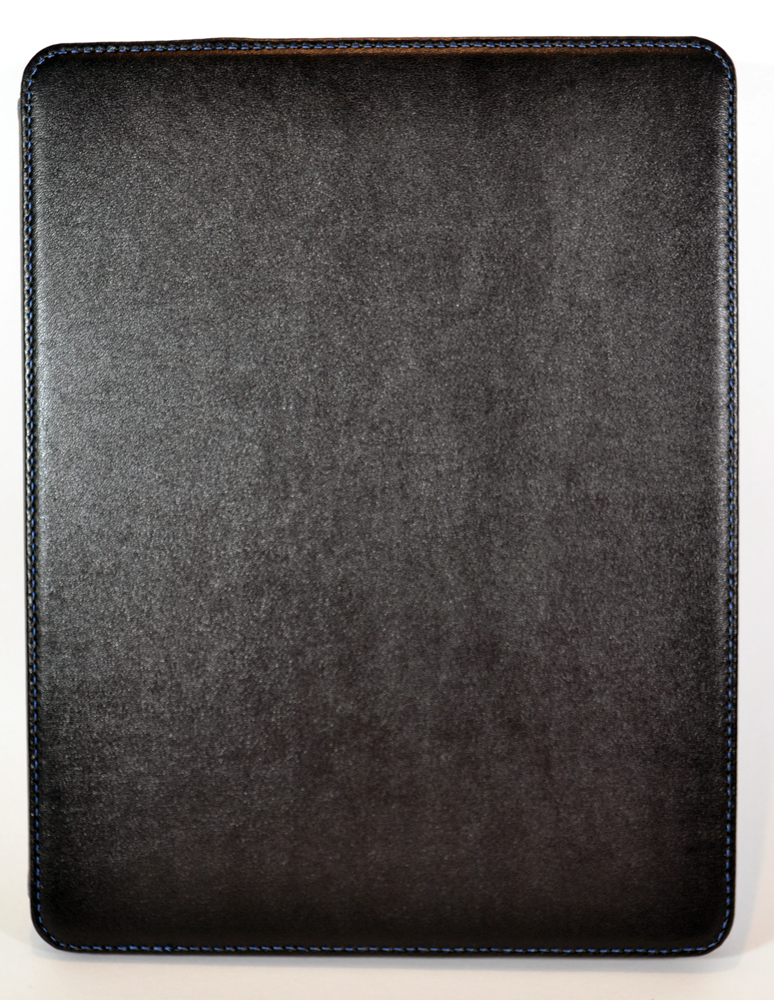
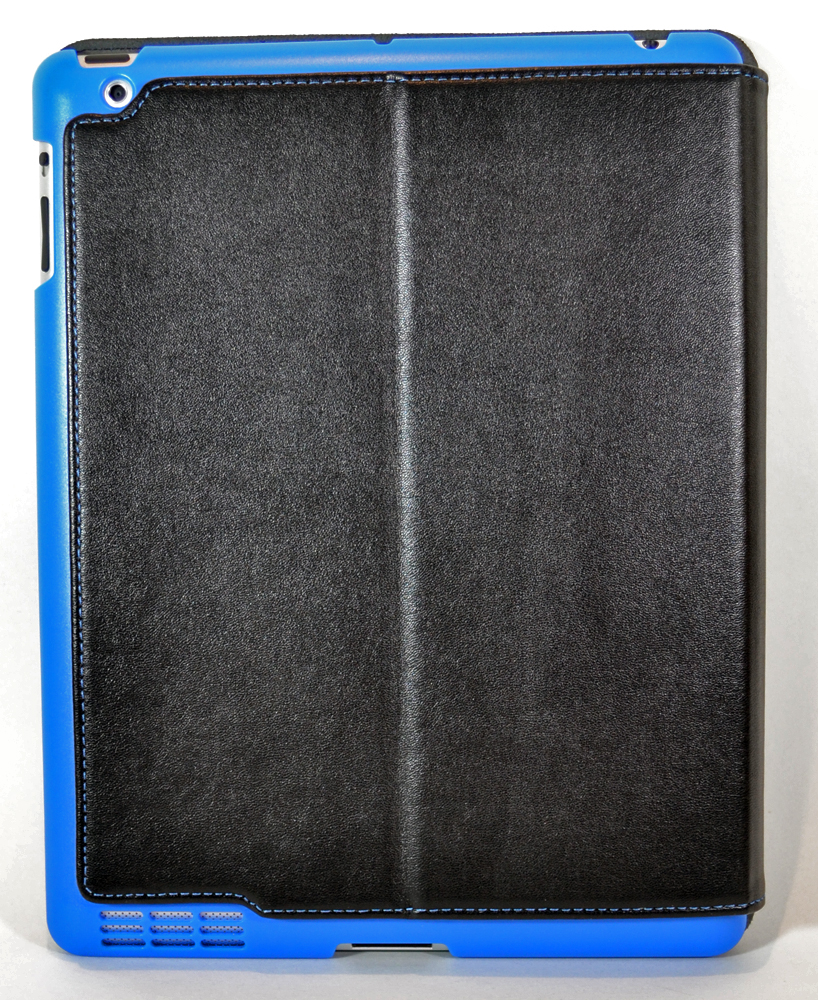
The Summit Case has a polyurethane exterior, but it has the look and feel of leather.  There is no branding on the exterior of the case.  The black stitching blends in with the black polyurethane, and the stitches are even and straight.  The Summit is a folio-style case, and it has no closure to keep the cover closed.  The exterior is available only in black, at least for the models now available.  The faux leather has a sheen, but it's not glossy.  The exterior is rigid; I don't know what the reinforcing material is.  It should add screen protection.

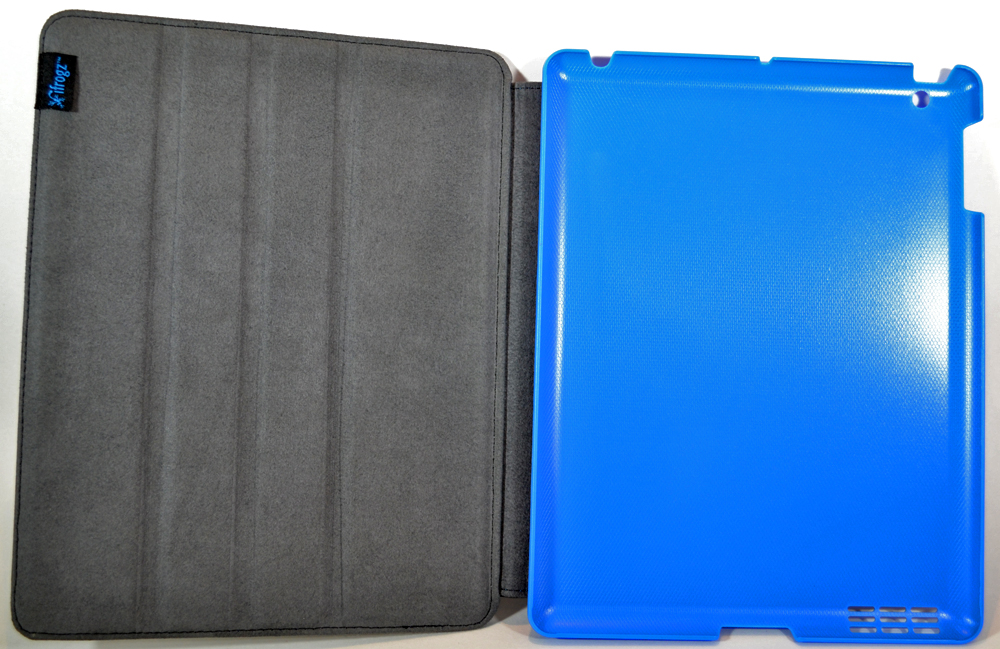
Inside, the case is lined with a medium-gray fabric with a very realistic-looking suede texture.  There's an iFrogz label sewn into the seam on the cover.  You'll notice the front cover has three "grooves" running vertically; these work to convert the Summit Case into a stand.

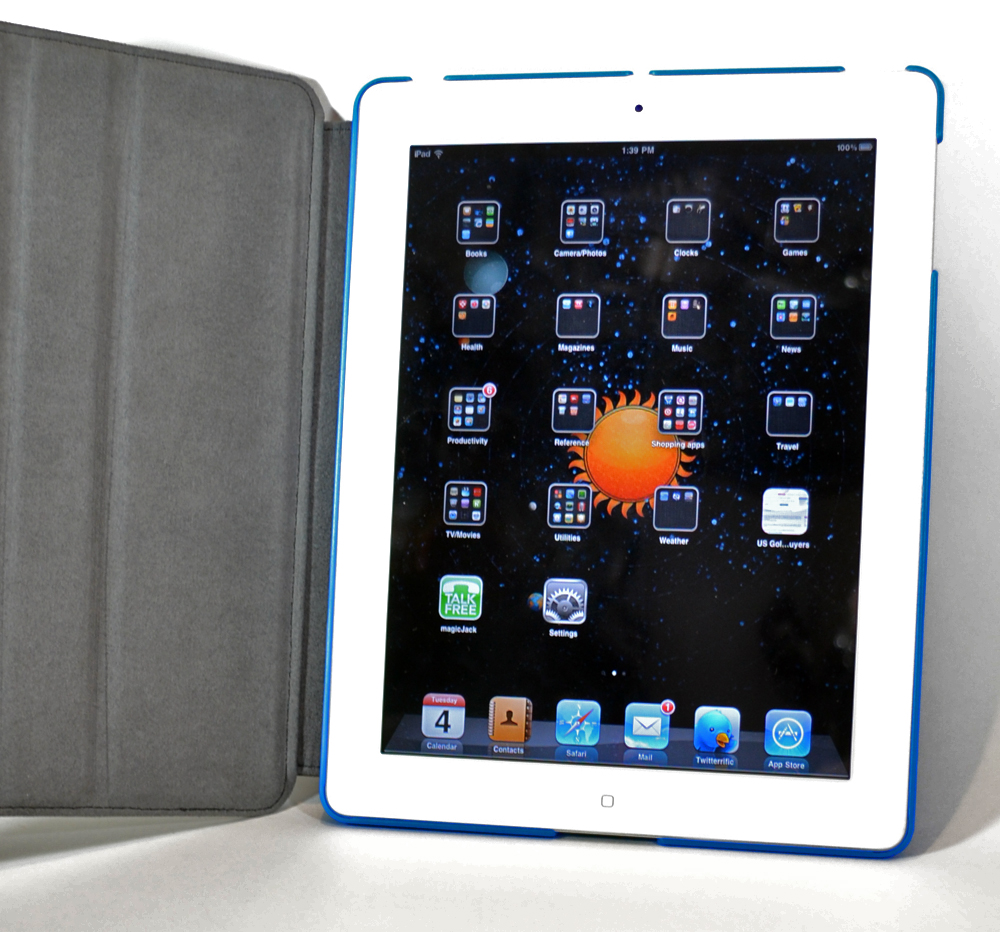
The iPad 2 is held in a polycarbonate core that cradles the back of the iPad 2 and snaps just over the edges of the device.  This core is available in black, blue, green, pink, and white.  The case I received has a medium blue core.  Inserting the iPad 2 into the core seems easy, but you need to make sure that the rim of the core is snapped securely over the edges of the iPad 2.  I found out the hard way that I didn't have mine completely snapped into the case.  Luckily the iPad 2 landed on the sofa beside me instead of into the floor.  Once it's snapped in, the iPad 2 is very secure.  It took a bit of effort to remove the iPad 2 when I wanted to photograph the empty Summit.  The core will add protection to the back and sides of the iPad 2.

I often find book-style covers hard to use because of the weight of the iPad 2 makes it hard to hold vertically.  I tend to use my iPad 2 horizontally, and the front flap often is in my way with many of these covers.  You can fold the Summit's front cover completely back, so you can hold the iFrogz Summit horizontally quite easily..

The core has cutouts for all controls and connectors and the back camera.  I didn't have any trouble using any controls, and I could plug in headphones and the charging cable with no problems.  There's a grid over the speaker that doesn't seem to interfere with the iPad 2's sound.

The front cover has a magnet under the sueded lining, so it can sleep/wake the iPad 2.  Because there is nothing to hold the cover closed, it can open and turn on the iPad when you're carrying it around.

Most folio-style cases I've tried also convert into a stand, and the front of the case attaches to the back with a hinge of some sort.  The front usually only attaches to the back at that one point, and the whole case has an extra decree of "floppiness" when you're trying to hold the case like a book.  iFrogz has a cure for this floppiness.  First of all, the flap that attaches the front to the back is much larger than used in many other cases.  Most of the back is covered with the faux leather, and only a small amount of the polycarbonate core shows as a color accent.  Inside, the spine-side of the core is attached to the faux leather exterior with a strip of Velcro.  The core is held tightly against the PU back piece until you rip open the Velcro.  It's not a very loud rriiippp, though.

Once the Velcro is open, you can prop the edge of the core into the grooves on the front cover.  The Summit works well as a horizontal stand in these three positions.  I found it worked well as a typing stand for the on-screen keyboard when I skipped the grooves and just "collapsed" the stand.

The iFrogz Summit is a nice option for people who want a folio case that converts into a horizontal stand.  It's well made with design details, like the Velcro, that some cases overlook.  The black polyurethane exterior is sedate, and the polycarbonate core allows you to go as business-like (black) or as wild (pink) as you like.  At $60, it's priced well, too.


Best regards
Ray1man

Posted by Rayman at 9:16 PM No comments:
Email ThisBlogThis!Share to XShare to FacebookShare to Pinterest

Saturday, September 24, 2011

9 Letter Word Riddle

Check out this video on YouTube:

http://www.youtube.com/watch?v=bx8LyeEzut4&feature=youtube_gdata_player


Best regards
Ray1man

Posted by Rayman at 11:06 PM No comments:
Email ThisBlogThis!Share to XShare to FacebookShare to Pinterest

Wednesday, September 14, 2011

Windows 8

Microsoft is pulling out the stops for the next release of windows. Microsoft looks like they have been working overtime with with unpinning releases of both the desktop-software and server editions. Also, they look to make major strides into the tablet and cell phone market. We will see if they can make to move with their new renewed enthusiasm and spirit.
Posted by Rayman at 8:09 PM No comments:
Email ThisBlogThis!Share to XShare to FacebookShare to Pinterest

Thursday, September 08, 2011

Let the IPAD connection begin....

I have been well consumed by my new IPAD. I am going to start a posting of sites, reviews and opinions on the IPAD.
Some of the best apps that I have found myself using.

EverNote - Great App for saving place , pictures and notes to self.

GetGlue is a social network for entertainment. Check in and review just about everything.

Let me know some of your fav's so i can post for future blog's

Posted by Rayman at 12:35 PM No comments:
Email ThisBlogThis!Share to XShare to FacebookShare to Pinterest

Tuesday, September 06, 2011

Atari Arcade Duo-Powered Joystick for the iPad


Atari Arcade Duo-Powered Joystick for the iPad - Coolest Gadgets

Since a lot of users want to use their iPad for games, Atari thought that they could make an accessory for that.

I suppose it is an effort from the company to make gaming as old-school as possible for the company's old-school titles. For example, you can get a lot of 2600 games on Atari's Greatest hits iPad App like Asteroids, Centipede, Missile Command and even more.

Of course, the 2600 joystick had only one button, and this guy has four. The joystick is also a different look than the old school console system, but the ball on the top is welcome. Perhaps you can get an attachment for a trackball like the Centipede arcade game of yore (actually, it was the early eighties).

This Atari Arcade Duo Joystick has been making the rounds on tech and gadget blogs, and most of them have been making comparisons to the iCade. The iCade definitely has the arcade-style video game set up and this product is available at ThinkGeek for a price of $99.99.


Best regards
Ray1man

Posted by Rayman at 8:40 PM No comments:
Email ThisBlogThis!Share to XShare to FacebookShare to Pinterest

Thursday, September 01, 2011

Makayama Movie Mount turns your iPad 2 into a video recording studio

SEPTEMBER 1, 2011 
BY JULIE : THE GADGETEER

It seems that small point and shoot video cameras like the Flipare going the way of the Dinosaur, as they are being replaced by smartphones like the iPhone 4. But have you ever considered using your iPad 2 as a video camera? Makayama gives you the ability to attach various accessories such as lenses, microphones, lights, tripods and even an optical viewfinder to your iPad 2 with their new Movie Mount case. This Smartcover compatible case offers some cool features such as the ability to attach 37 mm conversion lenses, like wide angle and zoom. It even allows you to easily slide the lens out of the way for on the fly changes. You can pre-order the Movie Mount for $69.95, with availability in October. Check out the demonstration video after the jump.


Best regards
Ray1man

Posted by Rayman at 8:04 PM No comments:
Email ThisBlogThis!Share to XShare to FacebookShare to Pinterest

Saturday, August 20, 2011

Happy Owl Studio Wallet for iPad 2

from The Gadgeteer by Janet Cloninger

Happy Owl Studio has a line of cases that incorporate  an iPad 2 frame into a book-style case.  Half the case has a zipper compartment that has room inside for your phone, credit cards, pens, and other essentials.  The back half of the case holds the iPad 2 in a frame that leaves ports and buttons open; even the back camera has a cutout.  The Wallet for iPad 2 is their unisex design, and it's available only in black.  They don't specify the material used, so I'll assume that means it's artificial leather.  The case can also be used as a horizontal stand for viewing and as a typing stand (shown).  The Wallet will start shipping at the beginning of September, and it is available now for pre-order for $79.99.

Filed in categories: iPhone, iPad, iPod related, News

Tagged: iPad 2 case and stand

Happy Owl Studio Wallet for iPad 2 originally appeared on The Gadgeteer on August 20, 2011 at 11:06 am.

Posted by Rayman at 9:12 AM No comments:
Email ThisBlogThis!Share to XShare to FacebookShare to Pinterest

Tuesday, August 16, 2011

Posted by Rayman at 11:11 PM No comments:
Email ThisBlogThis!Share to XShare to FacebookShare to Pinterest
Newer Posts Older Posts Home
Subscribe to: Posts (Atom)

Search for it

Powered By Blogger

About Me

Rayman
Project management, electrical guru
View my complete profile

Blog Archive

  • ▼  2025 (1)
    • ▼  July (1)
      • Thanks for the Memories .. Ozzy
  • ►  2023 (1)
    • ►  January (1)
  • ►  2018 (1)
    • ►  September (1)
  • ►  2016 (1)
    • ►  September (1)
  • ►  2015 (2)
    • ►  July (1)
    • ►  January (1)
  • ►  2014 (2)
    • ►  April (1)
    • ►  February (1)
  • ►  2013 (3)
    • ►  March (2)
    • ►  January (1)
  • ►  2012 (3)
    • ►  December (2)
    • ►  March (1)
  • ►  2011 (73)
    • ►  December (1)
    • ►  November (2)
    • ►  October (1)
    • ►  September (5)
    • ►  August (9)
    • ►  July (5)
    • ►  June (4)
    • ►  May (3)
    • ►  April (4)
    • ►  March (4)
    • ►  February (18)
    • ►  January (17)
  • ►  2010 (91)
    • ►  December (16)
    • ►  November (21)
    • ►  October (33)
    • ►  September (21)
  • ►  2009 (2)
    • ►  April (1)
    • ►  February (1)
Picture Window theme. Powered by Blogger.